eCash (ECX) Mining Tutorial
Updated: 2026-10-29
DxPool ECX mining is scheduled to open at 2026-10-30 02:00 (UTC), with both sub-account and wallet-address mining. Use this guide to configure your Bitcoin miner and check its connection. Mainnet mining requires the ECX network to activate; check the official eCash website for network status.
About eCash (ECX)
eCash (ECX) is a Bitcoin hard fork designed to support Drivechains. It uses SHA-256d, the same proof-of-work algorithm as Bitcoin, so Bitcoin mining hardware can mine ECX.
- Official website: eCash
- Block explorer: eCash Explorer
- Mining and hardware reference: Official ECX mining guide
Before you start
- Prepare a working Bitcoin SHA-256d miner with stable power and a wired network connection. Connect your computer to the same local network to access the miner's web interface.
- For sub-account mining, register a DxPool account and prepare your sub-account name.
- For wallet-address mining, prepare an ECX receiving address from a wallet that supports the ECX mainnet. Find wallet software on the official eCash downloads page. This mode does not require a DxPool account.
Before entering a receiving address, confirm that the wallet supports ECX and the correct network. Similar-looking Bitcoin and ECX addresses do not mean that a wallet supports both assets. Use a new address created specifically for ECX mining; never enter a private key or seed phrase in the miner's configuration.
Mining parameters
Choose one mining mode and use its username format:
| Setting | Sub-account mining | Wallet-address mining |
|---|---|---|
| Pool URL | stratum+tcp://ecx.ss.dxpool.com:3353 | stratum+tcp://ecx.ss.dxpool.com:3353 |
| User / Worker | sub_account.worker_name | ECX_wallet_address.worker_name |
| Password | Your choice, such as x | Your choice, such as x |
Replace sub_account with your DxPool sub-account name, or ECX_wallet_address with your ECX receiving address. Replace worker_name with a label for this miner, such as 001. Separate the two parts with an English period (.). The worker suffix is optional, but a different label for each miner makes monitoring easier.
For sub-account mining, an example username is example.001; replace example with your own sub-account. Do not enter your email address or phone number. The pool password is separate from your DxPool login password.
Configure the miner
-
Find the miner's local IP address using your router's device list or the manufacturer's management tool. Enter the IP address in a browser and log in to the miner's web interface.
-
Open Miner Configuration or the equivalent mining settings page. Locate the pool URL, worker and pool password fields.
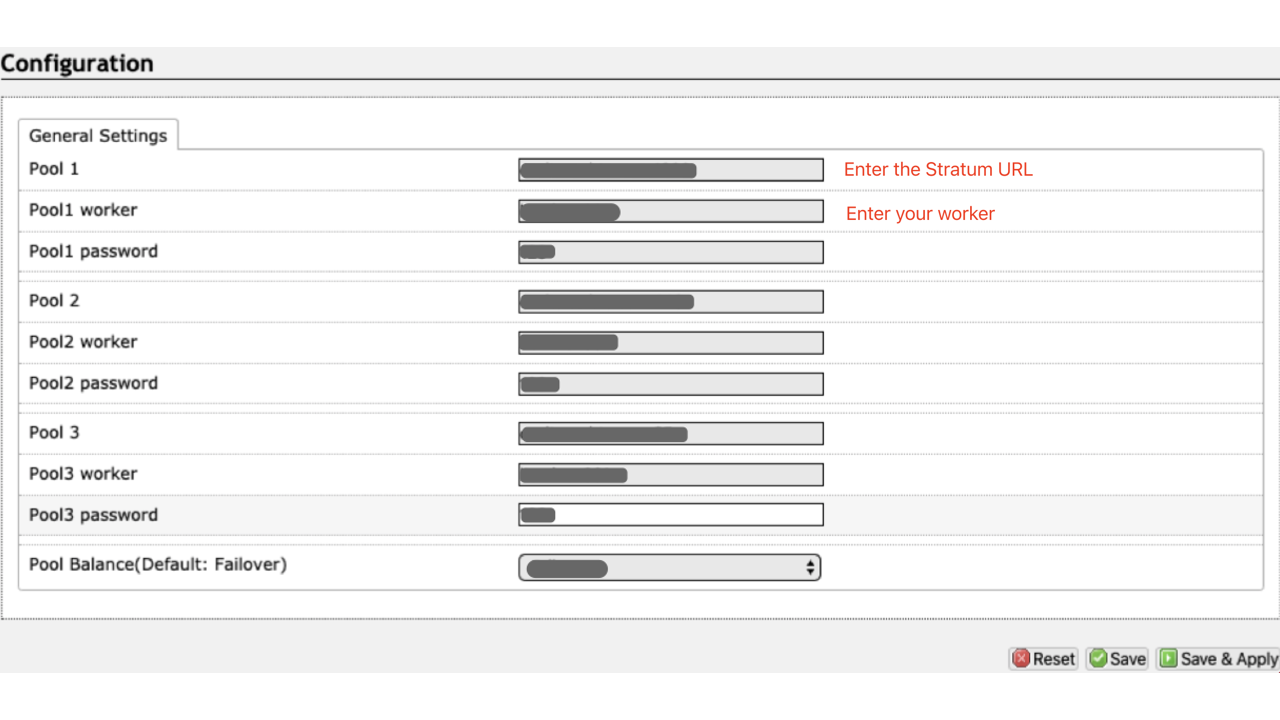
Interface reference: ViaBTC BTC Mining. The source image has its example values masked and is provided only to locate the fields. Enter the DxPool ECX parameters above; menu names may differ by firmware.
-
Enter the pool URL, your selected username and the pool password from the table. Check the domain, port
3353, and sub-account or ECX address before saving. -
Click Save & Apply or the equivalent save button. Open the miner's status page and check that it connects and begins submitting accepted shares after the service and network are available.
Check hashrate and earnings
Open the DxPool website and select the ECX pool:
- Sub-account mining: sign in and select the sub-account used in your miner configuration to view worker status, hashrate and earnings.
- Wallet-address mining: query using the same ECX address entered in the miner configuration to view its mining records.
Confirm both that the miner reports accepted shares and that the pool shows your worker's hashrate. Earnings are displayed according to the applicable settlement rules; a successful connection alone does not confirm that earnings have been credited.
Payments and withdrawals
Check the ECX pool page for the settlement method, pool fee and payment rules that apply to your mining mode. For sub-account balances, open Assets and select ECX to review available withdrawal methods, thresholds, fees and processing times. See Auto Withdrawal and Manual Withdrawal for general account withdrawal instructions.
For wallet-address mining, follow the payment rules displayed on the ECX pool page. Verify your ECX receiving address before mining.
Troubleshooting
- Cannot connect: confirm that the service and ECX mainnet are available, then check the miner's network connection, pool domain and port
3353. - Worker not visible: check your selected mining mode, username and period separator. Query the same sub-account or address used in the miner, and confirm that shares are being accepted.
- High rejected-share rate: check network stability, miner temperature and firmware compatibility. If the issue persists, use the DxPool support channels.